


FPE OC Maker: FPE Stickers
3.672.00 Reviews
App Specs
- Version
- 1.1.9
- Updated On
- License
- Free
- Downloads
- 1,000,000+
- Developer
- Revivoskin
- Categories
- Art & Design
- Platform
- Android
Screenshots
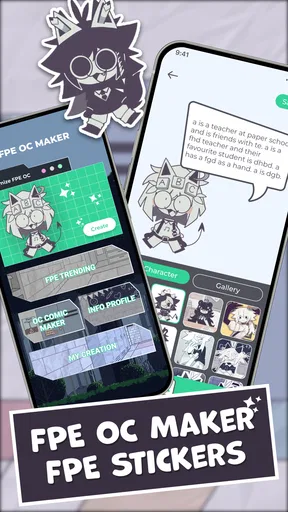
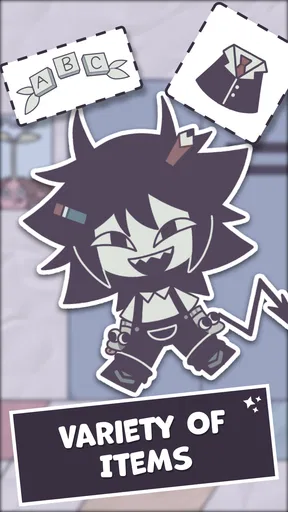
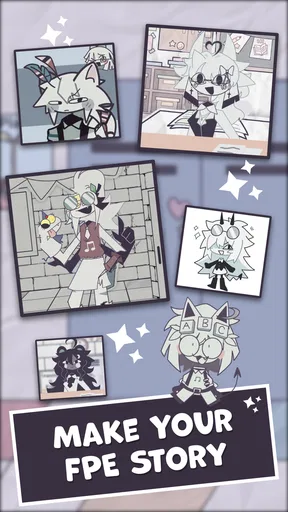
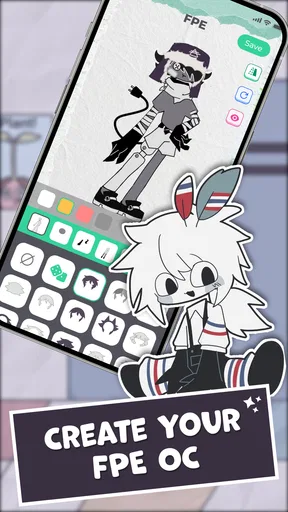
 Analysis by AppCompare
I usually open a character creator with a rough idea in mind: a color palette, a mood, or a little personality I want to turn into a face. That’s the kind of starting point that suits FPE OC Maker: FPE Stickers. It is a free art-and-design app from Revivoskin, built around making original characters in a paper-cartoon style and turning them into stickers. I’d recommend it most to people who want a quick, playful way to shape an idea visually, rather than a full drawing studio with a blank canvas and a long learning curve.
From a quick idea to a finished character
My most useful approach is to decide on the character’s mood before touching the options. A mischievous look, a shy expression, or a deliberately odd outfit gives each choice a purpose; without that small plan, it is easy to keep switching details just because they are available. I start with the face and hair, then choose clothes that support the same idea, and only then adjust the expression. That order helps the character feel intentional instead of like a pile of unrelated accessories.
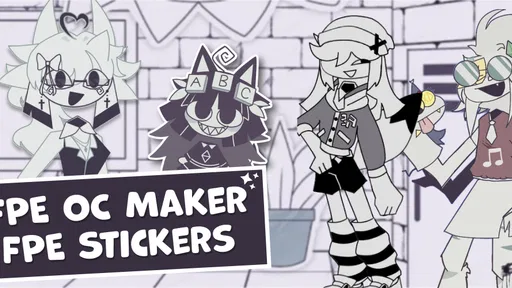
The paper-like cartoon look is part of the appeal. It gives creations a distinct, informal feel that works well for original characters, playful profile images, and sticker reactions. This is not the tool I’d pick to make polished painterly portraits or carefully controlled illustrations. Its strength is getting from a loose concept to a readable little character without needing to draw every line yourself.
In practical terms, the app is easy to approach even if you don’t spend much time with design software. I’d use it during a short break to sketch out a character idea, or while chatting with a friend who wants a custom avatar for a shared joke. You can also make a small set of expressions for one character, which is more useful in conversations than creating several unrelated designs that never get used.
Getting Started with Creativity
Right off the bat, FPE OC Maker: FPE Stickers welcomes you with a user-friendly interface that’s easy to navigate, even if you’re not tech-savvy. The app is designed for both Android and iOS users, so no one’s left out of the fun. Once you fire it up, you’re greeted with a plethora of customization options that range from hairstyles to clothing, and even facial features. The possibilities are virtually endless, and it’s quite thrilling to see your character come to life one step at a time.
One of the things I really appreciate is the straightforward design. There’s no need to wade through confusing menus or excessive ads that often plague free apps. Instead, you’re given a clear path to unleash your creativity at your own pace.
Dive into Customization
Now, let’s talk about the real star of the show: the customization features. The app offers an impressive array of options that allow you to fine-tune every aspect of your character. Want to create a funky avatar with bright green hair? Go for it! Feel like designing a more realistic character with subtle features? You got it. FPE OC Maker: FPE Stickers has something for everyone.
Worth Reading Before You Choose

EA SPORTS FC Mobile 26 Is a Bigger Football Game, but It Takes Time

Flipboard Shows What News Apps Must Do Beyond the Feed

Switching to Android Auto Means Rethinking Your Driving Routine

Google Calendar Makes a Crowded Week Easier to Manage

Ludo King Makes the Most of the Minutes Between Plans

Baby Panda World Brings Quick Play to Modern Phones, but Its Game Library Feels Busy
I found myself spending hours trying out different combinations—mixing and matching hairstyles, experimenting with quirky outfits, and tweaking facial expressions. It’s like having an endless wardrobe for your digital persona. And the best part? You can save your creations and even use them as stickers in your favorite messaging apps. That’s right, your characters aren’t just confined to the app; they can become a part of your daily digital conversations.
Putting creations to use
The handoff from designing to sharing is where I’d make a small plan before getting carried away: decide whether a character is meant for a chat sticker, an avatar, or simply a personal design you want to keep. For sticker use, a clear silhouette and an expression that reads at a glance matter more than tiny decorative details. I’d make the face and main colors do most of the work, then save a version that still looks recognizable when seen briefly in a conversation.
If I were making a reaction set for a friend, I’d keep the character consistent and vary the expression or pose concept from one creation to the next. That gives the set a familiar identity, while each sticker can answer a different moment in a chat. It is a more deliberate use of the creator than making one elaborate character and expecting it to cover every mood.
There is also a useful distinction between making something for yourself and making something to pass along. A personal avatar can be designed around your own taste, but a sticker intended for someone else should be readable and expressive to them, too. I’d show the finished image to a friend before relying on it as an inside-joke reaction; if the joke depends on a detail that disappears at sticker size, simplifying the design is usually the better choice.
A Few Surprises
While exploring the app, I stumbled upon a few delightful surprises. For instance, the app occasionally rolls out seasonal updates that bring new items and themes to the table. This keeps the experience fresh and gives you something to look forward to with each update.
Additionally, there’s a community aspect where you can share your creations and get inspired by other users. It’s a nice touch that adds a layer of social interaction and motivation to keep crafting.
Where the workflow can snag
Character creators make experimentation easy, but that can also turn into decision fatigue. When every new hair, outfit, or facial choice suggests another possible version, I can lose the original idea and spend time polishing details that do not improve the result. I get more out of the app when I set a simple limit for myself: settle on the overall mood, choose a small number of defining visual details, and stop once the character is recognizable.
Another trade-off is that a guided creator is not the same as drawing freely. The ready-made visual approach saves effort and makes it approachable, but it also means the result follows the style and choices the app provides. If I need exact control over line work, custom poses, or a highly specific visual reference, I’d use a drawing app instead and treat this one as a quick concept tool. For a relaxed character-making session, though, the constraints can be helpful: they keep me moving rather than staring at an empty page.
People deciding whether to try it may wonder if it suits complete beginners. I think it does, because the main activity is choosing and combining visual elements rather than learning a complex set of drawing tools. Someone who already illustrates confidently may still enjoy it for a fast avatar or sticker, but should not expect it to replace a full art program. If the goal is to create a character from scratch with precise control, a more open-ended editor is the better fit.
The app is rated for Everyone, and its free price makes it easy to try without committing to a purchase. It has a 3.6 average from around 1.1 thousand ratings, alongside over a million installs. Those figures suggest it has found an audience, while also leaving room for individual preferences: the simple, preset-based approach will click with some people more than others. It was released on June 12, 2025, and version 1.1.8 is the current version. It runs on Android 7.0 or later, so checking your device’s software before installing is a sensible first step.
Who I’d recommend it to
I’d point this app toward fans of FPE-style characters, people who enjoy making original-character concepts, and anyone who wants a light creative activity with a practical result to share. It can be especially handy when a group chat has a recurring joke that deserves its own character, or when you want an avatar that feels more personal than a standard profile image. The developer, Revivoskin, keeps the experience focused on that accessible character-and-sticker idea rather than turning it into a broad illustration workspace.
I’d skip it if your main goal is detailed digital painting, fine control over every shape, or a professional design workflow. I’d also avoid treating the first result as automatically ready for every use: an image that looks charming while editing may need a simpler expression or stronger contrast to work well in a fast-moving chat. A quick preview at the size you expect people to see it can save a frustrating redesign later.
Why You Might Love It
There’s something incredibly satisfying about seeing your imagination come to life in a tangible way. With FPE OC Maker: FPE Stickers, you’re not just creating avatars; you’re crafting stories and personalities with each character. It’s a wonderful outlet for self-expression, and it’s great for anyone who enjoys a bit of creativity in their downtime.
Plus, the fact that you can use your creations as stickers makes it a versatile tool for personalizing your chats. Whether you’re sending a quirky sticker to a friend or creating a unique avatar for your profile, this app has you covered.
If you’re someone who enjoys a good creative challenge or simply wants to add a personal touch to your digital interactions, this app is definitely worth checking out. So, why not give it a try and see where your imagination takes you?
Pros
- Easy customization options available.
- Wide variety of sticker templates.
- User-friendly interface design.
- Regular updates with new features.
- Supports high-resolution exports.
Cons
- Limited free sticker options.
- Occasional app crashes reported.
- In-app purchases can be pricey.
- Some features require internet access.
- Ads can be intrusive at times.
FAQs for FPE OC Maker: FPE Stickers
What is FPE OC Maker: FPE Stickers used for?
FPE OC Maker: FPE Stickers is an app designed for creating and customizing original characters (OCs) using a wide array of stickers and design tools. It allows users to unleash their creativity by designing unique characters, which can be shared with friends or used in various digital projects. Ideal for artists and hobbyists alike.
Is FPE OC Maker: FPE Stickers easy to use for beginners?
Yes, FPE OC Maker: FPE Stickers is designed with user-friendliness in mind. It features an intuitive interface and straightforward controls that make it accessible for beginners. The app provides step-by-step guidance and tutorials to help new users get started with designing their characters quickly and effectively.
Does FPE OC Maker: FPE Stickers offer in-app purchases?
While FPE OC Maker: FPE Stickers is free to download, it does offer in-app purchases. These purchases can include additional sticker packs, exclusive design tools, and premium features that enhance the customization experience. Users can choose to make these purchases to expand their creative options within the app.
Can I share my creations from FPE OC Maker: FPE Stickers on social media?
Absolutely! FPE OC Maker: FPE Stickers provides easy options for sharing your creations on various social media platforms. You can export your designed characters and post them directly to platforms like Instagram, Facebook, and Twitter to showcase your creativity and receive feedback from your friends and followers.
Is there a community or support available for FPE OC Maker: FPE Stickers?
Yes, FPE OC Maker: FPE Stickers has an active community where users can share ideas, tips, and feedback. The app also offers customer support to assist with any technical issues or questions users might have. Engaging with the community can enhance your experience and help improve your design skills.


